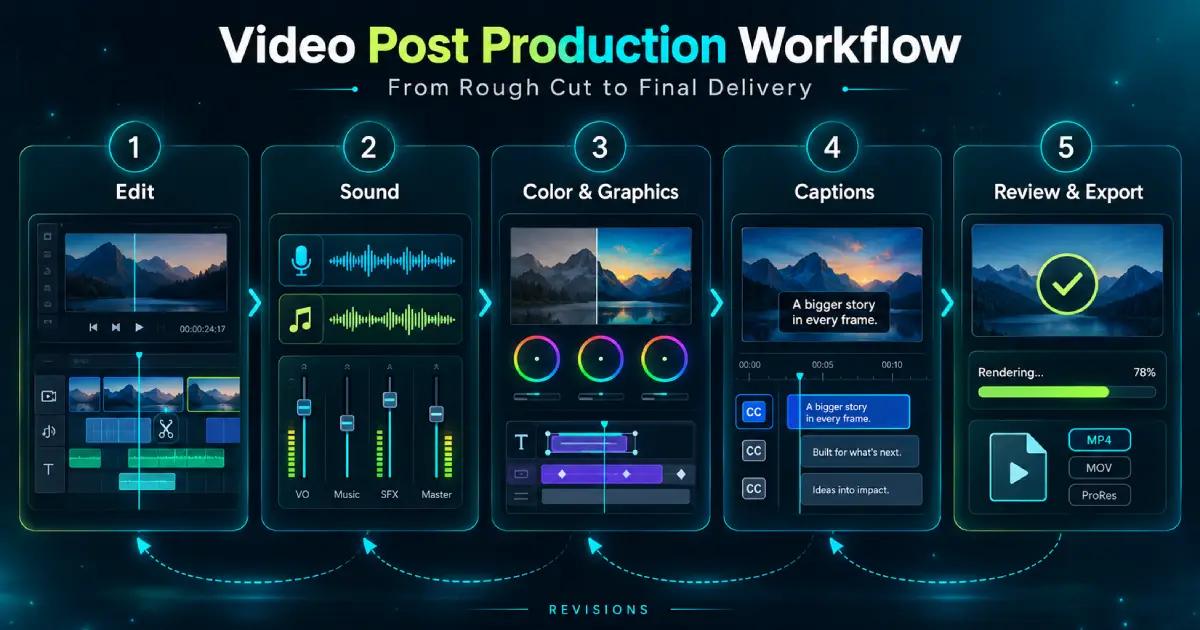
Video Post Production Workflow From Rough Cut to Final Delivery
Somebody on set says “we’ll fix it in post,” and the shoot wraps an hour early. Video post production covers everything that happens to footage after recording or generation stops: editing, sound, color, graphics, captions, and export. It’s where most of a project’s calendar goes, along with nearly all of its revisions.
Guides tend to draw post as a relay, with each stage handed cleanly to the next. Real projects rarely behave that neatly. A picture change in week two can reopen the mix, the grade, and every caption file already sent to the client.
What Is Video Post Production, Stage by Stage
The post production process runs in five stages:
- The edit, from assembly to picture lock
- Sound editing and mixing
- Color and graphics
- Subtitles and captions
- Final review and export
On a small project several of these collapse into one person’s afternoon, but the stages are still there even when nobody names them. A good video post production workflow treats them as connected rather than sequential, since most of the expensive mistakes happen at the joins.
People often fold all of it into the word “editing” when listing video production stages, and it undersells the work. Editing is the first of the post production steps and usually the longest. The finishing work after it catches more of the problems a viewer would actually notice.
The Edit: From Assembly to Picture Lock
Video editing starts before anyone makes a cut. Organize video footage the day it arrives: bins by scene, synced audio, takes labeled against the script. An editor hunting for the good take of shot 14 at midnight is a scheduling problem pretending to be a creative one.
The assembly comes first and runs long every time. From there the rough cut finds the story, usually by losing a third of what felt essential on the day. On interview-led pieces, a paper edit built from the transcript can save a full day here. Most of the real arguments on a project happen during this pass.
Picture lock is the agreement that timing won’t move again, and in video post production it’s the one date worth defending. The sound mix, the grade, and the captions are all built to exact frame counts. Editors call the locked version the final cut, and everything downstream is built to it.
When a producer asks for “one small trim” after lock, they’re asking for another round of sound, color, and subtitle work. Say so before agreeing to it.
Sound Editing, Mixing, Foley and ADR
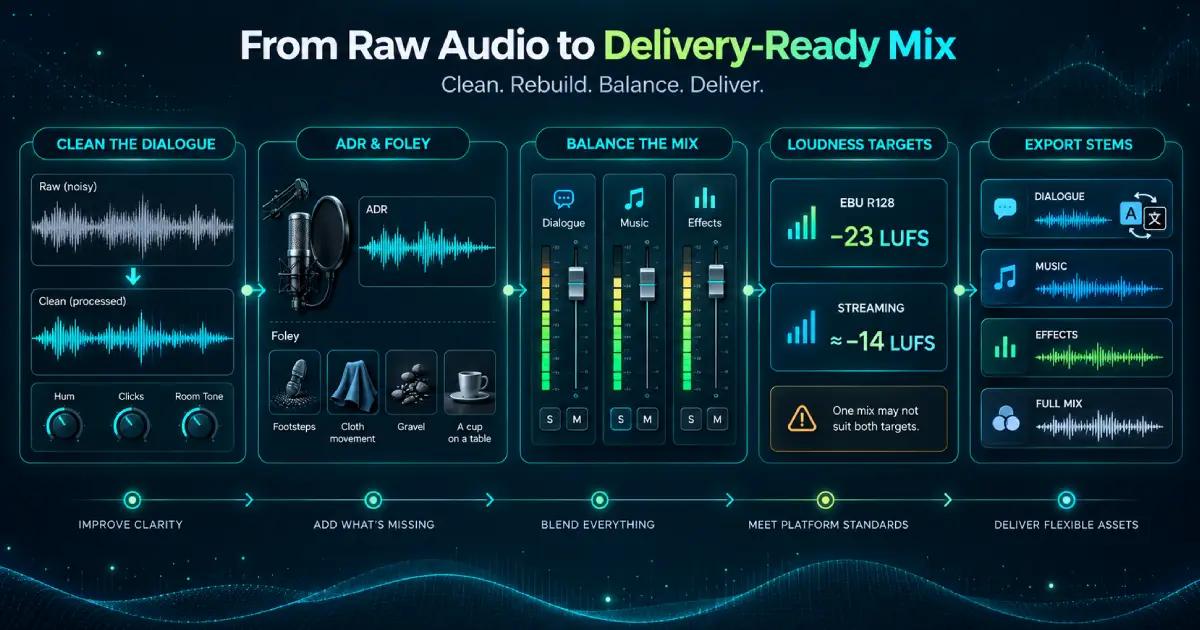
Sound editing is the unglamorous side of video post production: cleaning dialogue, removing hum and clicks, and filling gaps with room tone. Effects and music get laid in here too. Viewers forgive a soft image far sooner than audio they have to strain to hear.
Foley and ADR cover what the location recording missed. ADR, or automated dialogue replacement, rerecords lines that couldn’t be used, whether wind, traffic, or a performance that changed in the edit ruined them. Foley rebuilds the small physical sounds a boom mic rarely catches cleanly, like footsteps, cloth movement, or a cup set down on a table.
Foley stages have barely changed in decades. Most still keep crates of old shoes, trays of gravel, and the occasional bunch of celery for snapping bones.
Sound mixing balances everything into a final track that meets a delivery spec. European broadcast follows EBU R128 at −23 LUFS integrated. YouTube and most streaming services normalize playback to around −14 LUFS. A mix built for one sounds timid or crushed on the other.
Ask for the mix as separate stems for dialogue, music, and effects, alongside the full track. A translated version can then reuse the music and effects and only replace the dialogue.
Color, Graphics, and Visual Effects
Color correction and color grading
Color correction makes shots match and look accurate: white balance, exposure, and skin tones that don’t drift between cameras. Color grading comes after it and is a creative call, setting the look that tells a viewer how to feel about what they’re watching.
Footage shot in a log profile looks flat and gray straight off the card. A conversion LUT or a manual correction brings it back to normal contrast before any creative grading starts.
Grade on a calibrated monitor, then check the result on a phone. The client will review it on a phone at full brightness and ask for it darker.
Motion graphics and visual effects
Motion graphics carry titles, lower thirds, and animated diagrams. Visual effects cover anything that wasn’t in the frame on the day, from a replaced screen to a painted-out boom shadow.
There’s a fair case for keeping both light on short social cuts. A full graphics package on a 15-second clip can cost more to build than the clip will ever return. Whether it’s worth it depends mostly on how long the asset has to live.
Subtitles, Final Review, and Export
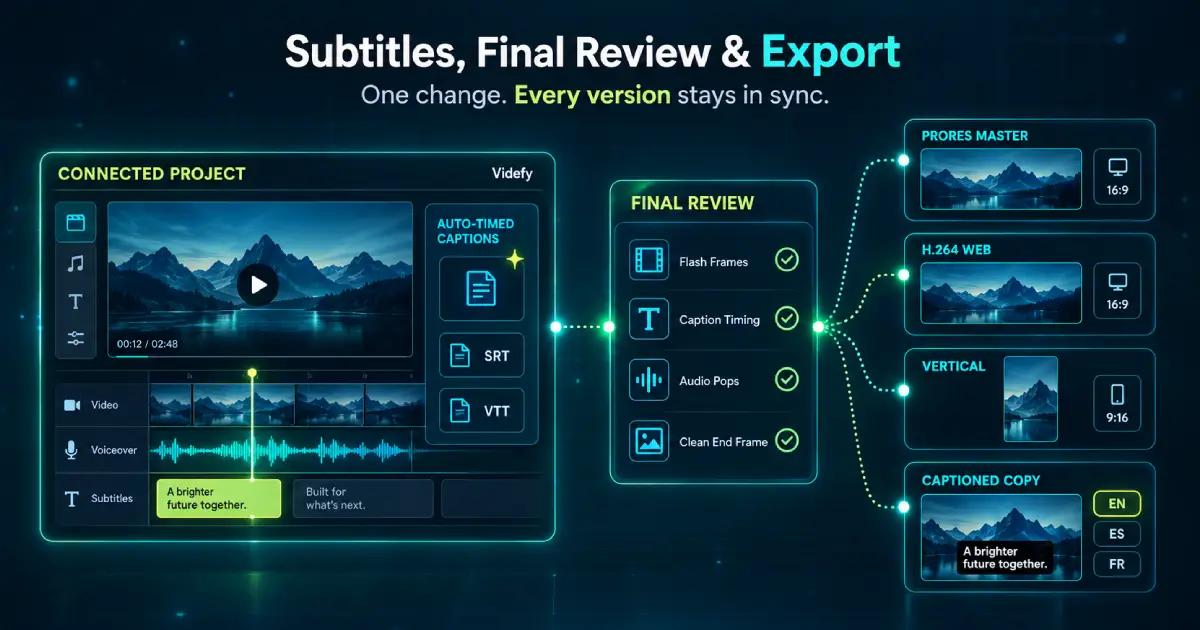
Subtitles and closed captions are different deliverables, even though people use the terms interchangeably. Subtitles transcribe or translate dialogue, while closed captions also describe relevant sound. Either can ship as a sidecar SRT or VTT file, or be burned into the picture as open captions.
Watch the exported file itself from start to finish before anything ships. Look for flash frames, caption timing drift, audio pops at edit points, and a clean last frame before black.
Final review and export is where versions multiply. An approved cut usually turns into a ProRes 422 HQ master for the archive, an H.264 file for the web, a 9:16 version for vertical platforms, and a captioned copy for every language.
In most setups every one of those versions is rendered, checked, and named by hand. When a single word of dialogue changes, every caption file and export built on it goes stale at once. Somebody then has to track down each one.
Videfy keeps editing, voiceover, subtitles, and render in the same project, and generates and times captions automatically. A changed line doesn’t mean rebuilding every caption file by hand. Post sits at the back end of the longer sequence covered in the full video production process.
If budget forces a choice, protect the mix and the captions before the grade. A grade can be redone and re-exported next month. A viewer who couldn’t follow the first version rarely comes back for a second.
Open a new project and run your next video post production pass without rebuilding the captions every time the edit moves.
Frequently Asked Questions
What are the main stages of video post production?
Video post production typically moves from an assembly and rough cut to a fine cut, approval, and picture lock. Finishing then covers sound editing and mixing, color correction and grading, graphics, captions, quality control, and delivery. The stages overlap, so a late edit can affect several downstream files.
What is the difference between a rough cut, fine cut, and picture lock?
A rough cut establishes the story and basic sequence. The fine cut tightens pacing, shot choices, transitions, and timing after feedback. Picture lock means the duration and edit points are approved and should no longer move. Locking too early hides unresolved problems; locking too late creates expensive rework in finishing.
How does Videfy support captions and localized video versions?
Videfy brings voiceover, audio editing, captions, translation, and export into the same project. During video post production, teams can translate spoken content and captions, preserve reusable music and effects, and prepare language-specific outputs. This avoids rebuilding the entire timeline whenever a campaign expands into another market.
How can teams create multiple video variations without rebuilding each version?
Start with an approved master video or reusable template, then change only the elements needed for each audience, language, platform, format, or message. Videfy keeps those variations within one connected workspace. Repeatable production workflows reduce duplicate setup work while preserving control over timing, branding, captions, audio, and exports.
How should video variations be prepared for external A/B testing?
Create controlled variations that change one meaningful element at a time, such as the opening hook, call to action, voiceover, length, or aspect ratio. Export each version with consistent naming and tracking. Videfy prepares the variations for testing, while the actual A/B test runs in an external advertising or analytics platform.
Learn with Videfy
Discover tutorials, AI best practices, feature updates, and creative inspiration to level up your video production.