Video Production Process: Concept to Multiple Final Videos
The video production process in plain terms: what happens at every stage, where the handoffs break, and how to turn one finished video into many.
Video Production Process: From Concept to Multiple Final Videos
The video production process is the sequence of stages that takes a video from an idea to a finished file ready to publish. Most teams can name the stages. Fewer have a version of the process that survives contact with a real deadline.
You spend more time moving files than making decisions. The second video takes as long as the first. The tenth takes as long as the second, because nothing you built the first time carried over.
Here’s what actually happens in each stage, and where the handoffs fail.
The Three Stages of Video Production
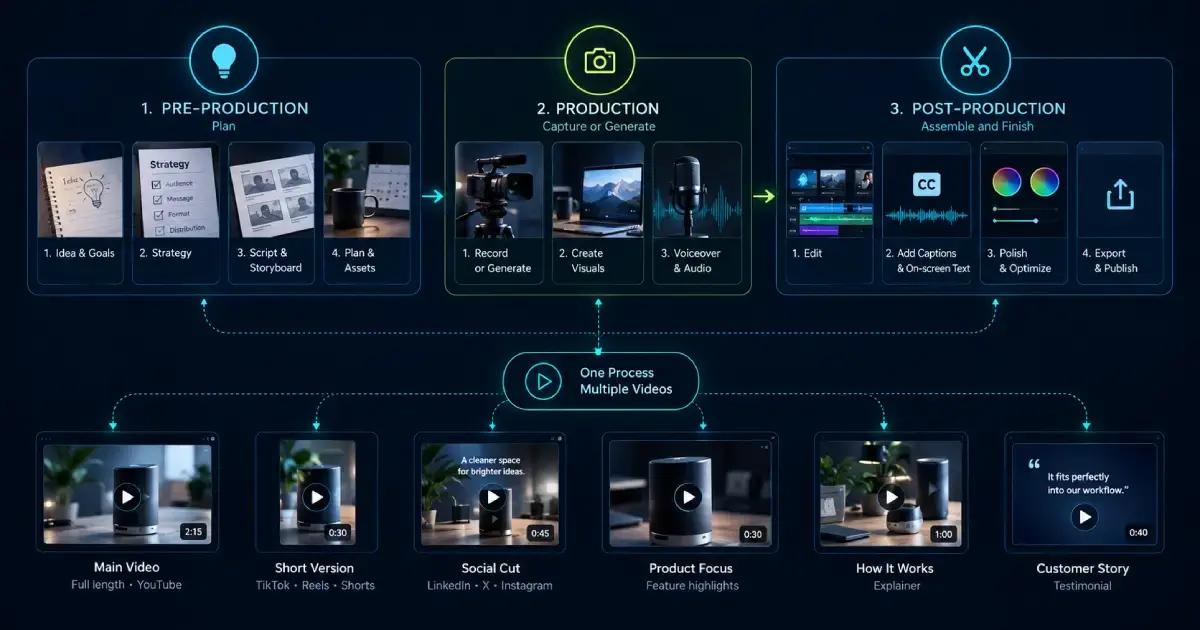
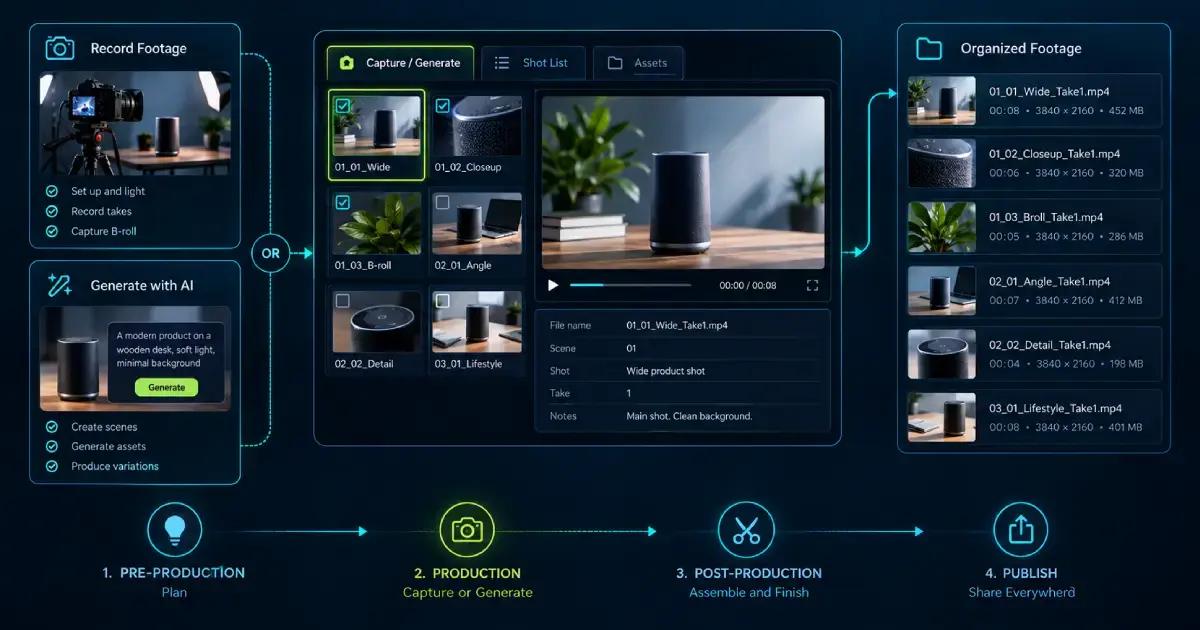
Every project runs through the same three stages of video production: pre-production, production, and post-production.
Pre-production is planning. Production is capture or generation. Post-production is assembly and finishing.
That’s the map for the whole video production process. The video production steps inside each stage are where the time goes, and a fragmented video production workflow is where it gets lost.
Pre-Production: The Decisions That Pay Twice
Pre-production is the cheapest place to fix anything. A change here costs a sentence. The same change after the edit costs a day.
Video production planning front-loads the decisions every later stage depends on. Skip it and the video production process stalls at the point you can least afford it.
Concept development and the brief
Video concept development starts with one question. What should the viewer do after watching?
One goal per video. If you’re writing “and also,” you’ve found your second video.
Put it in a video production brief: audience, platform, runtime, key message, call to action. One page. It’s what you point at when someone asks for a change three weeks later.
Script, storyboard, and shot list
Video scriptwriting turns the brief into lines a person can say out loud. Write for the ear. Short sentences, contractions, one idea carried the whole way through.
The video storyboard turns the script into scenes. It shows what’s on screen while each line is spoken, which is the part a script alone never tells you.
The video shot list is the checklist. Every setup, angle, and insert you need to capture or generate, so nothing turns up missing during the edit.
Budget and schedule
The video production budget and the video production schedule decide almost everything else. Both should exist before anyone opens an editor.
Build review time into the video production schedule. Approvals nobody booked cause more overruns than anything that happens on the shoot.
Production: Capture or Generate
The production stage is where the raw material gets made.
Traditionally that means shooting video footage: lighting the setup, recording takes, and collecting B-roll footage to cover cuts and carry the story between talking-head sections. B-roll footage is what makes an edit feel deliberate instead of choppy.
Increasingly it means generating instead. Scenes, characters, and assets described in plain language and produced without a camera. Mixed projects are common now, with generated backgrounds sitting behind recorded presenters.
Either way, work against the shot list rather than instinct. Tick items off as you capture or generate them, and label everything on the way in.
A naming convention is worth the two minutes it costs. Scene number, shot description, take number, in that order. The alternative is an editor scrubbing forty unlabeled clips to find the take you meant.
The job is the same in both versions. You leave this stage holding everything the edit needs, in a state the editor can actually find.
Post-Production: Editing, Audio, and Approval
Video post-production is assembly and finishing, and it’s where most of the calendar disappears.
Video editing comes first: rough cut, fine cut, picture lock. Then audio, including voiceover, music, and a mix that doesn’t bury the words. Then captions and color.
Video review and approval sits between picture lock and export, and teams consistently underestimate it. Comments arrive by email, on a shared link, and in a call, so nobody knows which version is current.
The fix is boring and it works. Keep feedback attached to the frame it refers to, in the same place the edit lives. One round of comments on the current cut beats three rounds on three different versions.
Final video delivery closes the stage. Render and export at the dimensions each platform expects, then hand off the files. Different platforms want different aspect ratios, so this is rarely a single export.
Where the Video Production Process Breaks Down
The stages aren’t the problem. The gaps between them are.
Script in one tool, voiceover in another, visuals in a third, edit in a fourth. Every handoff loses context. The script says one thing, the storyboard says another, and by the final cut nobody remembers which version got approved.
The cost shows up as repeated manual work. Change the hook and you’re back through generation, voiceover, captions, and export by hand.
A connected setup removes the handoffs instead of speeding them up. Videfy keeps the run in one workspace: script, storyboard, asset and video generation, editing, voiceover, subtitles, and export. We wrote up the thinking behind that in an efficient video production workflow.
From One Finished Video to Multiple Variations
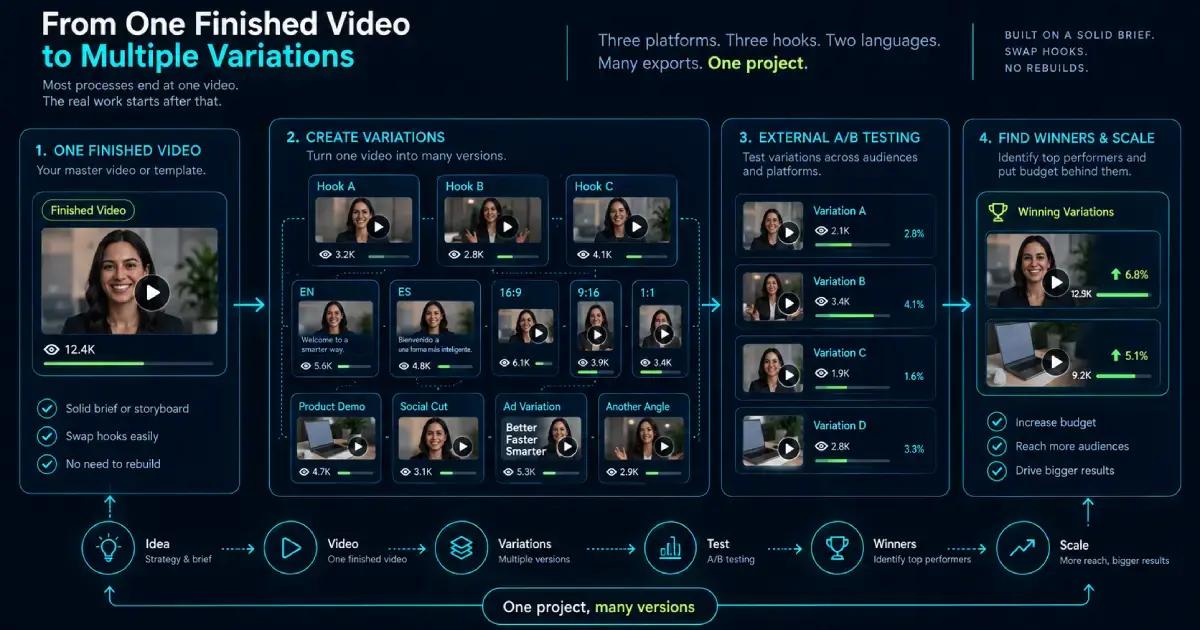
Most processes end at one video. That’s usually where the real work starts.
Three platforms, three hook variants, and two languages is eighteen exports from a single concept. Built by hand, that’s eighteen passes through editing, voiceover, captions, and render.
Built as variations, it’s one project. Videfy turns a finished video or template into multiple versions for different audiences, languages, platforms, and formats, then prepares them for external A/B testing.
You test, you see which versions hold attention, and you put the budget behind those. The shape of the outcome changes: idea, video, variations, test, winners, scale.
This is also what makes the earlier stages worth the effort. A brief that named one goal, and a storyboard tied to the edit, are what let you swap a hook without rebuilding the video.
Build the Process Once, Then Reuse It
A video production process is only worth having if it survives the second video. The stages are simple enough on their own, and nobody loses a week to the vocabulary.
They lose it to the gaps. Write the brief before the script. Keep the storyboard next to the edit. Book the approval time, and build variations instead of rebuilding videos.
Start your first project and run the whole video production process in one place, from script to finished variations.
Frequently Asked Questions
How do you estimate a video production timeline?
Start with the deliverables: runtime, number of scenes, languages, and formats. Estimate the time each stage of the video production process requires, including feedback and revisions. Check reviewers’ availability before setting the deadline. A short video with several approvers may take longer than a longer piece with one decision-maker.
What should you check in AI-generated footage before editing?
Review each clip for continuity, distracting artifacts, readable text, and consistency with the intended scene. Pay particular attention to faces, hands, product details, and movement between frames. Compare related shots together, not just individually. Replace unsuitable material before building the edit around footage that will require substantial correction later.
How do you keep multiple video variations organized?
Give each version a name that identifies its audience, hook, language, and format. Maintain a simple record of what changed and which exports are approved. Separate drafts from delivery files. This makes it easier to match an external test result to the exact creative version that produced it.
What needs checking when adapting a video for another language?
Translation affects more than the words. Check pronunciation, subtitle timing, line breaks, and whether the new voiceover fits the scene length. Review on-screen text, prices, units, and cultural references as well. Have a fluent reviewer watch the complete version so awkward phrasing or mismatched visuals do not reach viewers.
Does Videfy run A/B tests or prepare videos for testing elsewhere?
Videfy creates and exports video variations for external A/B testing; it does not run those tests within the production workspace. Testing, performance measurement, and budget allocation happen outside Videfy. Choose a success metric that matches the campaign goal, rather than treating attention or views as the only measure of success.
What should you include in a final video delivery checklist?
Watch every exported version from start to finish. Confirm the aspect ratio, cropping, audio levels, subtitle accuracy, and call to action. Check that each file uses the approved language and creative version. Keep editable source materials and clearly labeled exports so future updates start from the right version.
Learn with Videfy
Discover tutorials, AI best practices, feature updates, and creative inspiration to level up your video production.